From Instinct to Data: How I Learned to Manage What I Can’t See in Remote Project Management

The Core Problem: You’ve Lost Your Early Warning System
In an office, you have constant ambient awareness. You notice when someone is unusually quiet in a meeting. You see body language shift when a difficult topic comes up. You overhear the frustrated sigh from across the room. You catch the hesitation before someone answers a question.
All of this happens without conscious effort. It’s your brain doing pattern recognition in real-time, flagging anomalies before you even know why you’re paying attention.The research backs this up. A study from the SANS Institute found that 59% of organizations believe a lack of visibility poses a high or very high risk to their operations. And that’s from the security perspective—the same principle applies to team dynamics.
When teams go remote, those signals vanish. As one researcher put it, “When your team becomes invisible, all those critical signals are dropped”. You can’t read the room because there is no room.
What Actually Happens When You Lose Those Cues
1. Tension Escalates Before You Know It Exists
In-person, you catch friction early. A passive-aggressive comment in a meeting gets a quick sidebar afterward. A misunderstanding gets cleared up by the coffee machine.
Remote, that same friction lives in Slack threads and email chains. By the time you notice it, people have been stewing for days. The issue has been discussed (badly) without you. Positions have hardened.
A study on virtual teams found that poor communication contributes to project failures in up to 30% of cases. And it’s not just about frequency of communication—it’s about quality. When you remove non-verbal cues, misunderstandings multiply.
2. You Confuse Activity with Progress
This is a trap I fell into repeatedly. In the office, I could see when someone was stuck. I’d notice them staring at their screen, walking to get coffee for the third time in an hour, or having the same conversation with a colleague.
Remote, all I saw was green Slack statuses and completed tasks. The struggle was invisible.
The research on distributed development found that communication overhead creates 23% productivity loss from async delays . But here’s the thing: that 23% isn’t evenly distributed. Some team members bear more of that overhead. Some get stuck silently. Some disengage.
You can’t see any of this in a task completion report.
3. Trust Takes Longer to Build and Breaks Faster
In a physical office, trust builds through repeated small interactions. You see someone follow through. You watch them help a colleague. You have informal conversations that reveal character.
In a remote environment, the study from Binghamton University found that leadership perception shifts from charisma to responsiveness . You’re trusted not because of your presence, but because of your actions. Follow-through becomes everything.
The problem is that trust also erodes faster when people can’t read intentions. A delayed response feels like dismissal. A short email feels like anger. Without tone and body language, we fill in the gaps with our own anxieties.
4. Burnout Goes Unnoticed Until Someone Quits
This one hurts to admit. I’ve lost good people because I didn’t see them drowning.
In the office, burnout has visible signs. Bloodshot eyes. Messy desk. Short temper. Coming in early, leaving late. These are signals.
Remote, a burned-out person looks exactly like a productive person—right up until they disappear.
What I’ve Learned to Do Differently
I can’t give you a magic solution. But I can tell you what’s working for me.
1. I Stopped Managing Hours and Started Managing Signals
The research from Code Climate made this clear: “Metrics are lagging indicators, and they are not diagnostic.” If I wait until deliverables slip to notice a problem, I am already behind.
I now look at what they call daily signals for stuck work:
- Infrequent code pushes or commits
- Pull requests that sit open for days
- Tasks that keep getting moved sprint to sprint
These are leading indicators. They tell me someone is struggling before they fall behind
To ensure I have visibility, I have created a separate channel for my projects in a communication tool such as Slack, MS Teams, or ClickUp and integrated Github with it. So whenever there is code push, PR created, deployment (pass/failed), the automate flow sends a message in the chat.
Tip: If you are using MS Teams, connect it with a channel instead of a Group Chat.
2. I Changed How I Run Meetings
The study on virtual team leadership found that “leadership is more relational than individual.” In other words, it is not about who talks the most. It is about who facilitates others talking.
I have started doing the following:
- Opening every one-on-one with “How are you doing?” and waiting for a real answer
- Using video whenever possible, knowing that 70% of communication is non-verbal, even if imperfect
- Building in process checks where we talk about how we are working, not just what we are doing
Tip for Effective Meeting Management
Use AI tools to transcribe and build a summary of the meeting. After the standup, send a note in the channel so that everyone is aware of what the team plans to achieve for the rest of the day.
Here is the format I use:
Yesterday
I completed the Login story.
Today
Planning to complete the forgot password and remaining authentication module.
Blockers
Still waiting for the API for forgot password.
You can also generate this content using AI. You can use any AI tool. I personally use CoPilot. Here is how you should do:
- Record the standup meeting.
- Copy the transcript.
- Paste it into an AI tool.
- Write this prompt: “Generate the summary of the standup meeting in the format of Yesterday, Today, and Blockers for each participant.”
For stakeholder meetings, follow the same approach. Use this prompt instead: “Generate the summary of the meeting and write it in MOM format.”
3. I Embrace Structured Communication
The advice from Professional Security Magazine stuck with me: “Without the corridor conversations that happen in an office, information gaps can grow quickly” .
I now use:
- A single source of truth for all project information (no more hunting through email chains)
- Clear communication channels (Slack for urgent, email for records, weekly sync for alignment)
- Regular, structured check-ins focused on the person, not just the task
Tips to Organize Communication
I follow this process to keep communication clean and effective:
If something is urgent, do not waste time on back and forth messages. Request a call instead.
When dealing with a production hotfix issue, do not communicate via emails or chat messages. Schedule a group call and coordinate with the team. However, to make it effective, avoid any blame game and keep the focus on the issue. Save the “why it happened” conversation for a retrospective call.
Use video recording tools such as Loom to explain project requirements. I also use Bandicam, which allows recording for up to 10 minutes. Attach the recording to the PBI or User Story so that everyone can access it easily.
For any project, big or small, create a shared repository. Add all important files there, including scope documents, sprint reviews, release notes, retrospectives, and other key artifacts.
4. I Use Data to See What I Can’t Sense
I resisted this at first. I wanted to be the kind of manager who just “knew” how my team was doing.
But the reality is that in a remote setting, I need tools to extend my senses. Research on AI-driven conflict resolution shows that tools can analyze communication patterns, detect early signs of tension, and accelerate resolution processes.
I am not using AI yet. But I am using the following:
- Sentiment analysis in retrospectives
- Workload distribution metrics to see who is carrying too much
- Engagement tracking to see who is participating in meetings and who has gone quiet
Tip: Custom Dashboards for Project Visibility
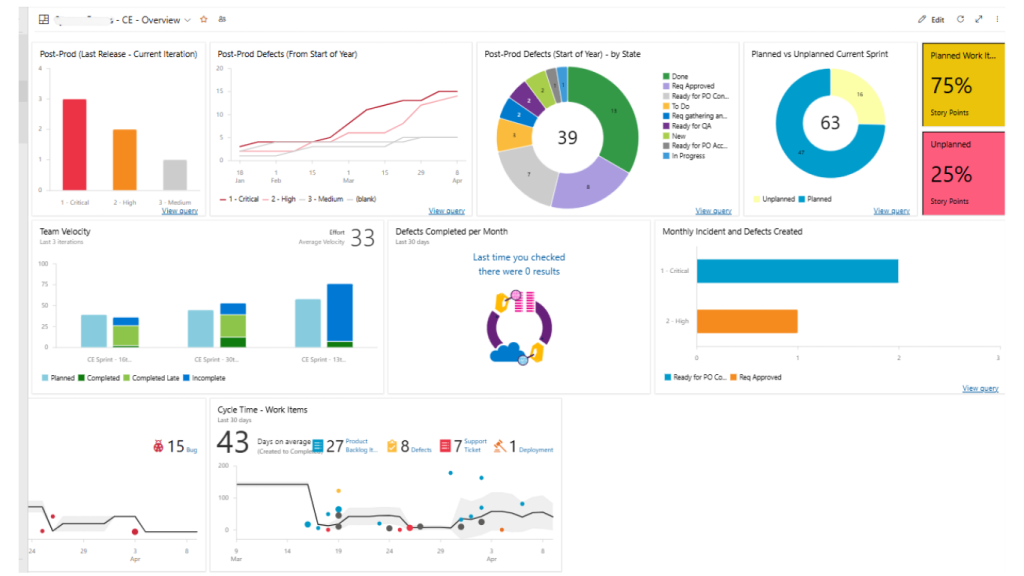
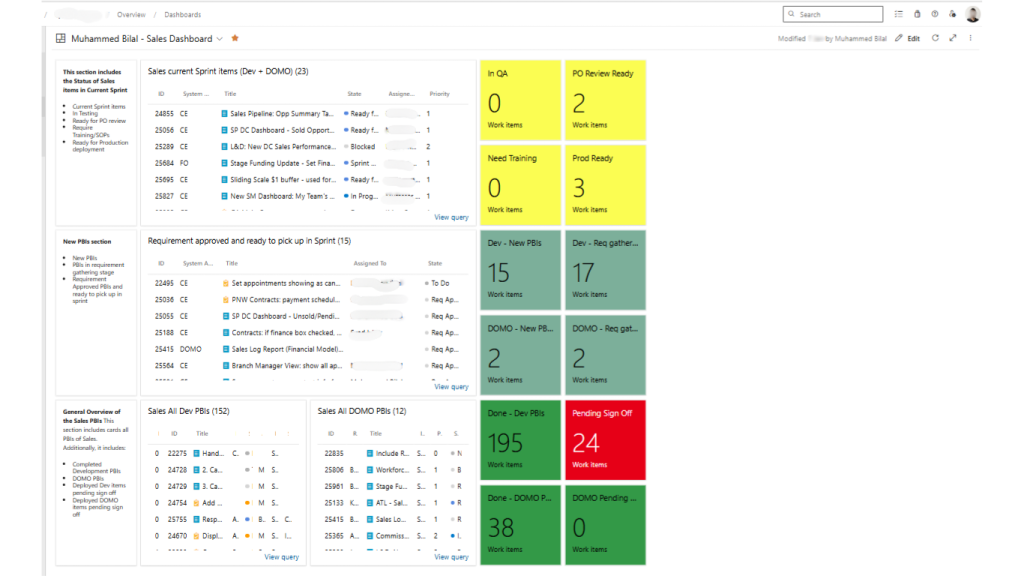
As I am currently managing a Dynamics 365 project, I use two customized dashboards. One for the ongoing sprint and another for upcoming priorities.
Sprint Dashboard includes:
- Sprint status at task level
- Sprint burndown chart
- Team velocity and individual developer velocity
- Planned vs unplanned work. This helps me analyze how much out-of-scope work we are handling during the sprint.
Planning Dashboard includes:
Created to see the bigger picture in terms of:
- Current sprint status
- Upcoming sprint priorities
- Overall status of all tickets
5. I Lead with Trust, Not Surveillance
This is the hardest balance to strike. I need visibility, but I cannot micromanage.
The forbearance leadership research is instructive here. Leaders are aware of problems within their organization and have the resources to solve them, but deliberately choose not to intervene. This allows employees the opportunity to learn, grow, and find solutions on their own.
But this is critical. This approach only works if my team knows I am paying attention. When they know I am in their corner, this hands-off approach can build both confidence and creativity. There is a fine line between giving space and ghosting
Tips to Build Trust and Reduce Micromanagement
One thing that really helps is being proactive and staying one step ahead of the team.
For example, developers often lose trust when they are asked to redo their work. A simple solution is to write detailed requirements covering all basic elements: the background of the work, the solution, and the acceptance criteria.
Always welcome questions. Encourage the team to ask questions frequently to minimize back and forth. Let them own the decisions, but create an environment where decisions are made by taking all stakeholders into consideration.
Focus on outcomes, not on output. For remote teams, it is important to realize that the only metrics to track progress is the outcome. Make resources accountable for the number of bugs produced in their work, not on the amount of work they took on.
For example, if a task was estimated for 4 hours but extended to 12 hours simply because the developer did not pay attention to the requirements or ask the right questions, that is a big red signal on performance.
A Different Discipline Requires a Different Approach
Remote project management is not just in-person management with video calls. It is a fundamentally different discipline.
I cannot rely on instinct because my instincts were built for a different environment. I have to be intentional about creating visibility. I have to use data to extend my senses. And I have to accept that some things will slip through the cracks, then build systems to catch them before they become crises.
The organizations that figure this out are the ones that will thrive in a distributed world. The ones that do not will keep wondering why their projects are failing despite everyone being “available.”